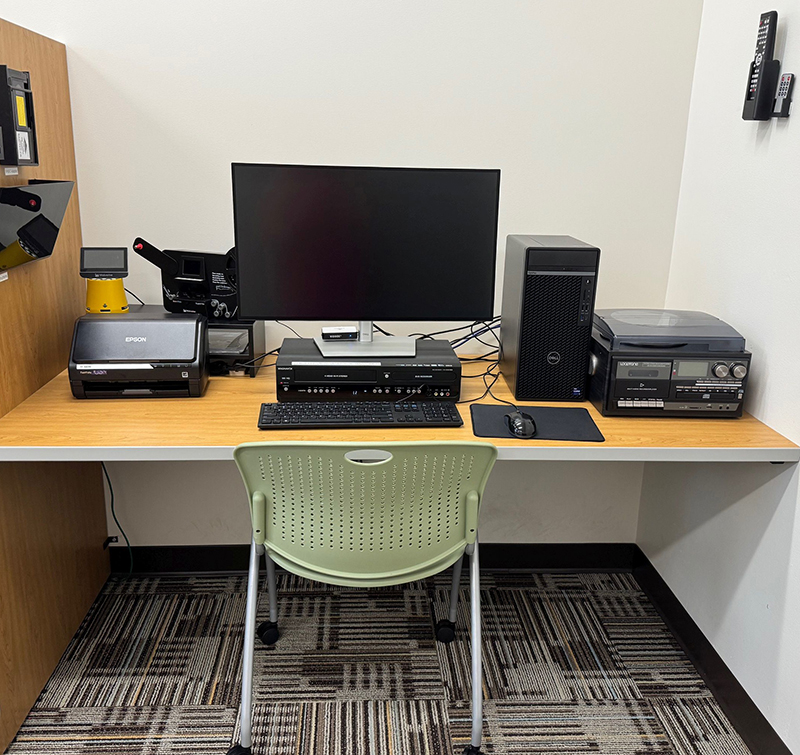
Our digital conversion station allows you to preserve precious memories in a digital format, including photos, film, reels, DVDs, VHS, cassette tapes and records.
Make an Appointment
https://www.lanepl.org/makerspace/appointments
One-on-One Assistance:
If you require assistance or want to learn more about digital conversion, you can set up a one-on-one appointment with Tech Center staff by calling (513) 785-2727 or emailing techcenter@lanepl.org.
Appointments are strongly recommended. We do accept walk-in patrons, but without an appointment, there is always the possibility that someone else will be using the room or the equipment at that time.
Details
What Is the Memory Lab?
The Memory Lab is a digital conversion station. It can help you to preserve legacy media like home videos, mix tapes, records, photo negatives and more by converting them to a digital format. Appointments are offered on a first-come, first-served basis. A signed waiver is required.
Waiver:
Patrons must sign a waiver before use. This waiver can be obtained at the Tech Center staff desk or downloaded here.
Time Commitment:
Digital conversion is a hands-on activity that requires you to stay on site until your project is finished. Please plan for approximately double the run time of your project.
Cost:
Use of the Memory Lab is free, but the Tech Center cannot store files for patrons in the public computers. Patrons should bring their own digital storage or be prepared to purchase an SD card or a flash drive.
Patrons working with VHS, DVD, or music files should bring wired headphones (with a standard audio jack, not bluetooth). If needed, patrons can borrow public use headphones or purchase $1 earbuds at the desk.
Compatible Storage:
Patrons should bring their own SD cards and/or USB flash drives for storage. Depending on availability, the Tech Center may sell high capacity SD cards and flash drives. Alternatively, patrons may use their own Cloud Storage accounts or external hard drives (formatted for Windows).
- 32 GB SD Card ($8 for purchase)
- 128 GB Flash Drive ($8 for purchase)
- Cloud Storage (provided by the user)
- External Hard Drive (provided by the user, Windows compatible)
Compatible Media:
- Super 8 & 8mm reel-to-reel film
- 35mm, 110, 127, 126, and APS film
- Photo negatives
- Slides
- Most photographs
- Most printed documents
- VHS tapes
- VHS-C tapes
- DVDs
- Cassette tapes
- CDs
- 33, 45, & 78 RPM vinyl records
Machines & Technology:
- Epson FastFoto FF-680W Wireless High-speed Photo Scanning System
- Wolverine Data Titan 8-in-1 High-Definition Film to Digital Converter
- Wolverine 8mm & Super 8 Reels to Digital MovieMaker Pro Film Digitizer
- Magnavox ZV427MG9 DVD Recorder/VCR Combo
- LoopTone Record, Cassette & CD Player & Recorder
- Splicer & splicing tape
- VIDBOX Video Conversion Suite
- Adobe Premiere Creative Cloud Suite (Premiere Pro, Photoshop, etc.)
View Only Option:
The device that digitizes VHS tapes and DVDs does allow for simple viewing (without recording). The best way to do this is to activate Advanced Mode and start viewing, but not to press the record button.